
|
#1
●
04-30-2012, 08:35 PM
| ||||||||
 ★The Queen★ Poster Rank:68 Female Join Date: Jun 2011 Posts: 23,496
Contributions: 120
Mentioned: 95 Post(s) Quoted: 3083 Post(s)
| ||||||||
|
Punch to Boxer's Face Nasty Looking!
That's definitely going to leave a mark. When boxer Tony Pietrantonio stepped into the ring over the weekend against Lavarn Harvell, he wanted to make a name for himself as a boxer, not as a viral sensation showing what actually happens to the human face at the moment a perfect, knockout blow is delivered. Pietrantonio's features were temporarily pulverized beyond all recognition as a powerful right from Harvell made devastating contact. Even his ears are shockwave-rippled. The hit came just 31 seconds into the third round of the light heavyweight matchup, and Pietrantonio was down for the count. Doctors were brought into the ring, but Pietrantonio was ultimately able to walk out of the ring himself. Picture may be viewed here: http://now.msn.com/now-plus/0430-kno...distorted.aspx |
|
#3
●
04-30-2012, 09:47 PM
| ||||||||
 My Rank: STAFF SERGEANT Poster Rank:806 male Join Date: May 2011 Posts: 977 Mentioned: 1 Post(s) Quoted: 4 Post(s)
| ||||||||
|
Re: Punch to Boxer's Face Nasty Looking!
RIGHT CLICK PICTURE SAVE TO HARD DRIVE OPEN DR CLICK SELECT FILES FROM YOUR COMPUTER SELECT PICTURE, CLICK OPEN CLICK PREVIEW POST IF YOUR UNSURE CLICK SUBMIT DONE! 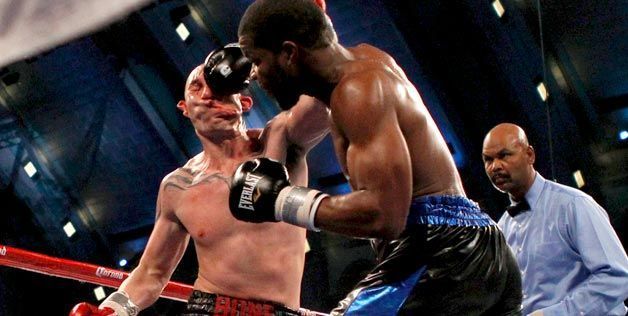 · |
|
#6
●
05-01-2012, 01:25 AM
| ||||||||
| ★The Queen★ Poster Rank:68 Female Join Date: Jun 2011 Posts: 23,496
Contributions: 120
Mentioned: 95 Post(s) Quoted: 3083 Post(s)
| ||||||||
|
Re: Punch to Boxer's Face Nasty Looking!
Thank you. I will try. I've already been through abuse by some people because I can't get it! It took me months to get an avatar on here. If the article and picture are together, I don't get how you save the picture and the text is still there, too. When I click, "select files from your computer", it takes me to my saved photographs taken with cameras. I use film and digital. |
|
#7
●
05-01-2012, 06:01 AM
| ||||||||
| My Rank: STAFF SERGEANT Poster Rank:806 male Join Date: May 2011 Posts: 977 Mentioned: 1 Post(s) Quoted: 4 Post(s)
| ||||||||
|
Re: Punch to Boxer's Face Nasty Looking!
I'm sorry you have come across peeps that want to be mean about things that are new to you. Let's try to clear this up for you. First, if you want text to appear above your picture you are uploading just write as normal. After writing your little opening blurb, follow the directions I wrote above. Now to find the pictures you have saved off the internet.... When you first save the picture to your hard drive you are choosing the "save picture as" option from right clicking on it. This will open up a window with all your places on your computer on the left in a bar. To make things super easy click on a word in the list you see called "Desktop". By clicking this, the file you are renaming and saving, will go straight to your computer desktop. Now go to your DR Topic posting you were making and click that "Select files from your Computer" button. You will see that same window open from when you saved that picture before. Again click the "Desktop" word in the list on the left. You will now be looking on your desktop for that picture you saved. (which should be super easy unless you have a million things on your desktop) Click on it and then hit open. It should be right there in your post ready for the masses. I really hope this helps you because I enjoy the topics of a lot of the threads you start, but become discouraged every time I see those links. I know most are from newspapers and news stations, but I opt out of a great deal because of weird looking links. Good luck to ya! |
|
#10
●
05-01-2012, 05:07 PM
| ||||||||
| ★The Queen★ Poster Rank:68 Female Join Date: Jun 2011 Posts: 23,496
Contributions: 120
Mentioned: 95 Post(s) Quoted: 3083 Post(s)
| ||||||||
|
Re: Punch to Boxer's Face Nasty Looking!
Thank you again, grimekeepa! Will try again next time. I'm glad you appreciate my posts. I find them interesting myself and that is why I share them. I have had some very nice people help me, too! They know who they are :) I sincerely appreciate it. |




 the picture!
